
The best Text to Music AI app (generate billions of songs) that works on your desktop or laptop, powered by AI, it's FREE.
-
Create your own songs for free. It's unlimited for lifetime. No subscriptions (monthly / yearly).
-
Make billions of songs, Generate and test unlimited times. No usage limitations.
-
Make song with AI automatically using our Pixbim Text to Music AI app.
NOTE - We suggest not to buy it without trying.
We have released only GPU version so try it out for free, make sure the free version runs on your laptop or desktop and see the results.
Create Billions of Song for Lifetime — No Subscription Fees!
Download Free Text to Music AI
Try it as many times as you want before making a purchase. Pixbim Text to Music AI works only on Nvidia GPU-powered machines. If you want to try it, start with the provided sample inputs and generate a few AI songs. Once you're familiar with how it works, try generating songs on your own inputs.
Buy Pixbim Text to Music AI $5 $7
Making music the traditional way is exhausting. You’ve got to learn an instrument, memorize music theory, and learn confusing production software. Then you have to pick sounds, arrange tracks, record, and mix the whole thing. It's just way too much work just to get a basic idea and into the world. But what if you could literally just type out a description of the song or music which you want and watch it happen? AI Music, think about it. AI creates songs or AI creates music tracks for you. Yes, it is possible with AI music generator.
---Its Unlimited for Lifetime. NO Subscriptions. NO Credit or Usage Limits---
Instead of agonizing over every single note yourself, you just start by describing what you actually want. Tell this software about the mood, the style, the instruments, or just the overall vibe you are chasing. This AI song generator takes your exact words and turns them into a real track. You can make your own song without a paramount hurdle. Just describe it, put your lyrics & tags and get the song.
How Pixbim Text to Music AI Exceeds Customer Expectations?
Want to try AI song generation without worrying about credit usage limits or restrictions? Use Pixbim Text to Music AI, the one-stop solution for creating your own songs with no limitations.
Unlimited AI Song Generation
Think, imagine and create your own music and songs a million times without any interruption for lifetime. Unlike other music generator apps that impose limitations on the number of songs you can generate per day, such as five songs per day, many AI singing apps restrict users and hinder their creative flow. They have to wait until the next day or wait until the cooling period, which hinders their progress and workflow. Pixbim Text to Music AI does not impose any restrictions or usage limits. I mean, you can try it millions of times without any interference in your workflow, allowing you to successfully generate your dream song.
Flexible Inputs Picks
You can generate millions of full-length AI songs for your projects and other requirements without any restrictions. No prior musical knowledge is required. All you need is a prompt and lyrics to create the song.
Use Pixbim Text to Music AI Billion Times, No Usage Limits. It's Truly Unlimited.
Uninterrupted Creation
You will not see messages saying that your credits have been exhausted or that you need to try again later. You can make music on your own without any sudden interruptions. Whether you are working on projects that require tons of attempts and want to select the best songs and musical track, Pixbim Text to Music AI is the one stop music generator for you.
Lifetime Usage
No subscriptions. No daily or monthly limits tied to credits. No restrictions on commercial use. No concerns about your data being stored or processed in the cloud. Simply purchase it once and make unlimited songs for a lifetime.
Pixbim Text to Music AI features
1. Pixbim Text to Music AI is a very user-friendly AI music app. Just enter a prompt and lyrics, you can start the process by simply clicking the Start button.
2. It is a one-time fee with lifetime validity.
3. No subscription. Pixbim Text to Music AI has no monthly or yearly subscription.
4. Pixbim Text to Music AI provides unlimited AI music generation. You can create millions of AI songs without any restrictions on usage or duration.
5. Pixbim Text to Music AI ensures 100% user data privacy, as it runs and saves the AI-generated songs directly on the user's desktop/laptop.
6. Pixbim Text to Music AI never operates in the cloud. It is a standalone AI music generator.
7. Users do not require an internet connection, as it can work offline. Creators can enjoy their creative space, even from remote locations, and make their dream music come true.
8. Pixbim Text to Music accepts your song description as a prompt. It is an ai music generator from text which can make song from your lyrics. Just enter your lyrics and describe what kind of song you want. It is a smart AI model that can produce AI songs according to your requirements. You can use tags as well to add the instruments you need in your AI song or AI musical tracks.
9. Pixbim Text to Music AI provides free trial for users. You can make your own song for free in the free version. After that you can make your buying decision.
How to Create a Song Using Pixbim Text to Music AI?
Pixbim Text to Music AI is the AI software that composes music and songs just with a prompt and lyrics. It is a AI music creator that can make professional AI songs.
Step 1: Download Pixbim Text to Music AI
Download Free Text to Music AI
Download Free Trial Text to Music AI
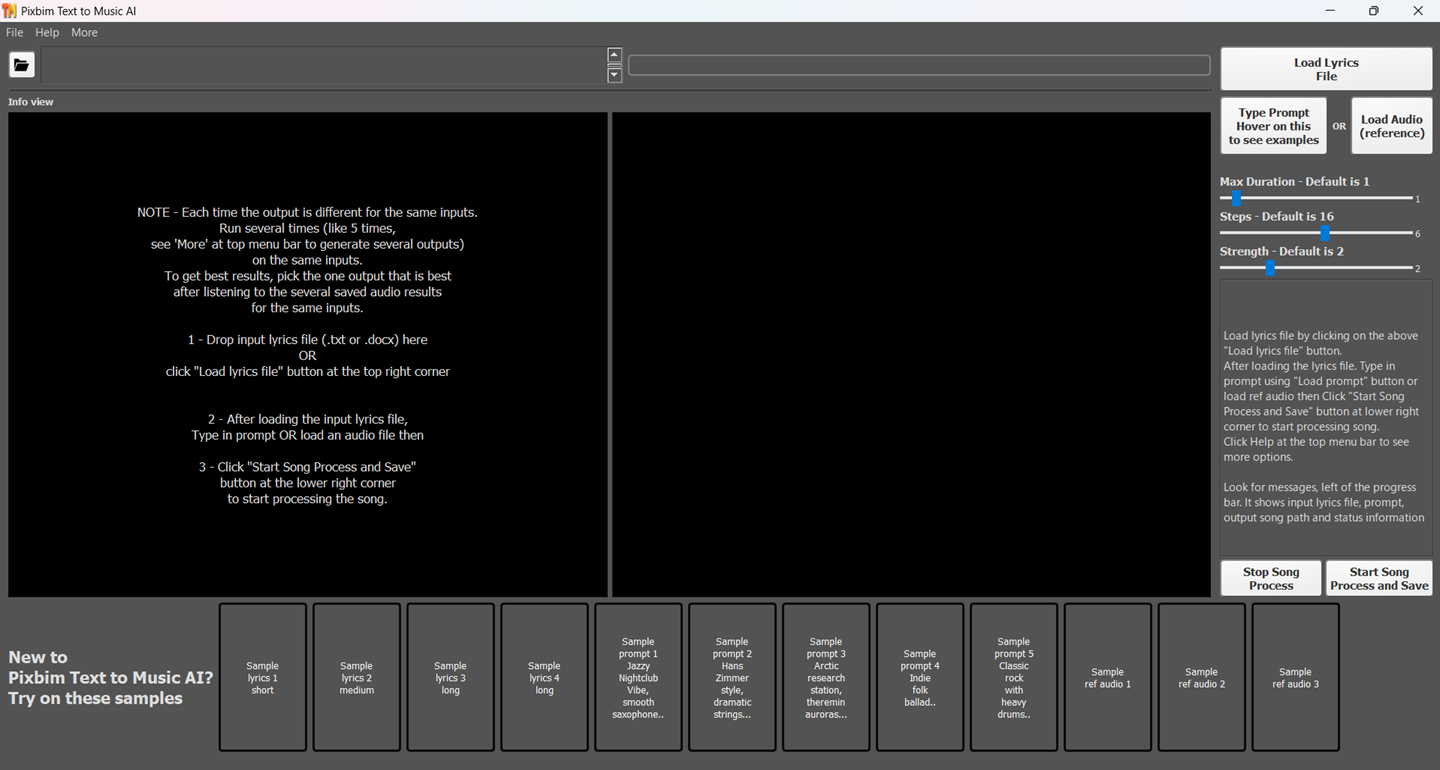
Download Pixbim Text to Music AI application. Install it on your desktop or laptop.
There are input samples provided along with Pixbim Text to Music AI. After opening the dashboard, you can see them and try them out for quick testing and generate song results.
Step 2: Load your lyrics file
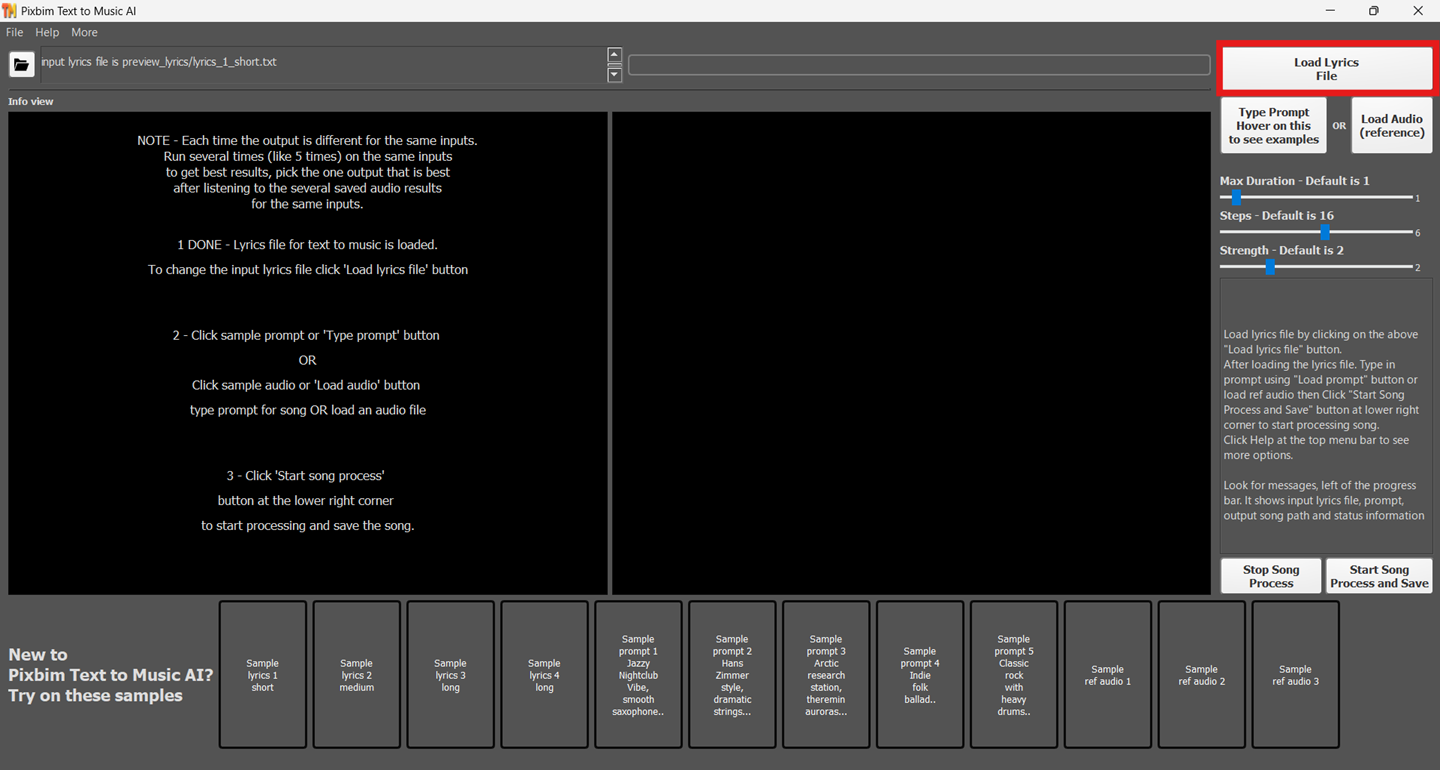
You can load your lyrics file into Pixbim Text to Music AI, and it will intelligently read them and create a AI song with the lyrics file. It is one of the best AI lyrics-to-song generators, allowing you to create songs that sound professionally made.
Here is an example of lyrics file -
I found your smile beneath the evening sky,
A little piece of heaven passing by.
The world grew quiet when you looked at me,
Like every road had led me where I'd be.
Step 3: Describe your song (type in your Prompt)
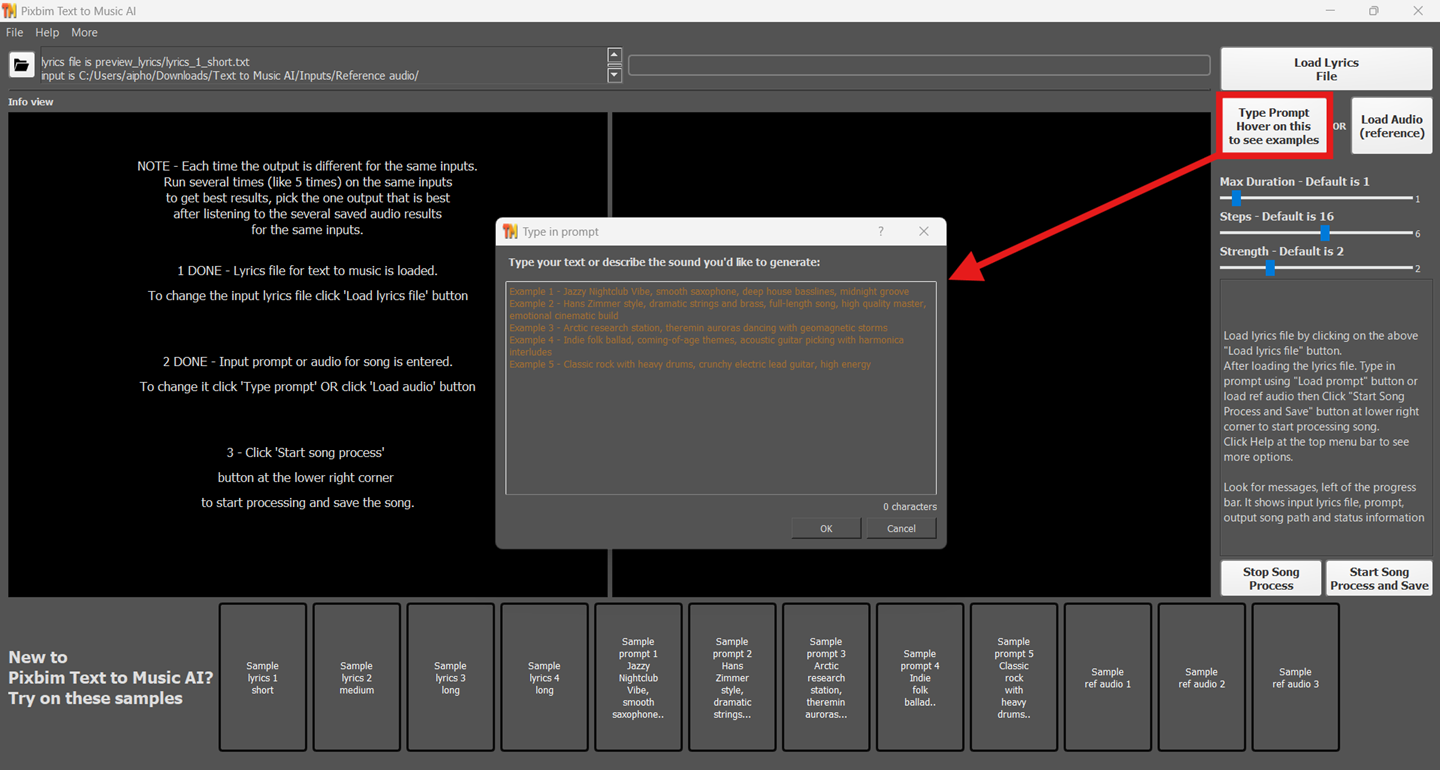
Describe your song. Tell us what kind of song you want, what mood you need, and what instruments you want to include. It is a text-to-song generator that can accept the user's prompt.
Below are few example prompts -
1. Jazzy Nightclub Vibe, smooth saxophone, deep house basslines, midnight groove
2. Hans Zimmer style, dramatic strings and brass, full-length song, high quality master, emotional cinematic build
3. Arctic research station, theremin auroras dancing with geomagnetic storms
Step 4: (Optional) Load reference audio
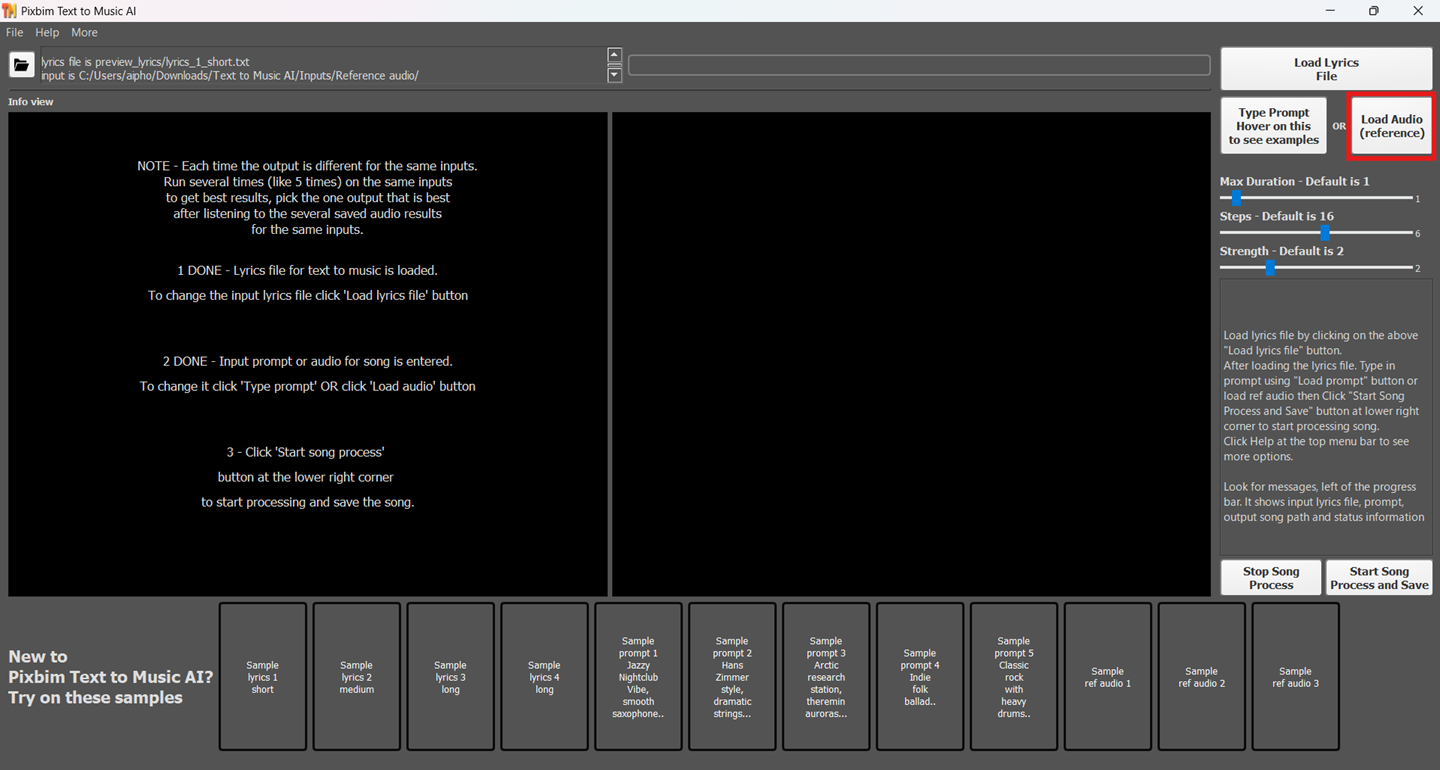
This is optional, Load your reference audio. If you have a song or vocal in mind, simply download it and load it. A 15-second reference audio clip is more than enough. You can just cut a part of the reference audio and load it. Click the ‘Load Audio (Reference)’ button and load the reference audio file.
Note - You can either provide a prompt or a reference audio to generate your required AI song, No need to provide both prompt and reference audio.
Step 5: Start song generation process
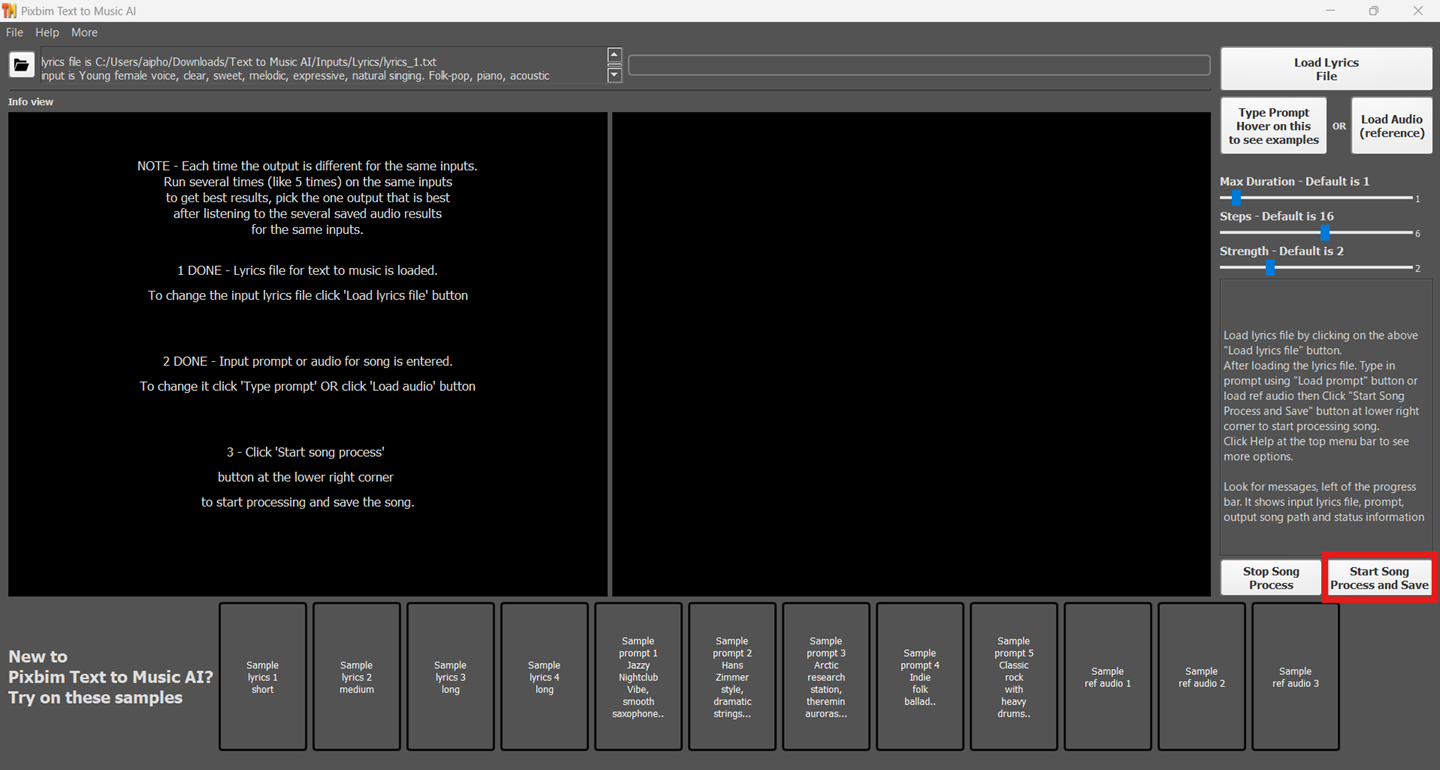
Now, start the music generation. Click the ‘Start Song Process and Save’ button and save it in the required location. It will ask you to save the AI-generated music output in your preferred location. You can see the progress bar as the music or song is generated.
Step 6: Access the Output
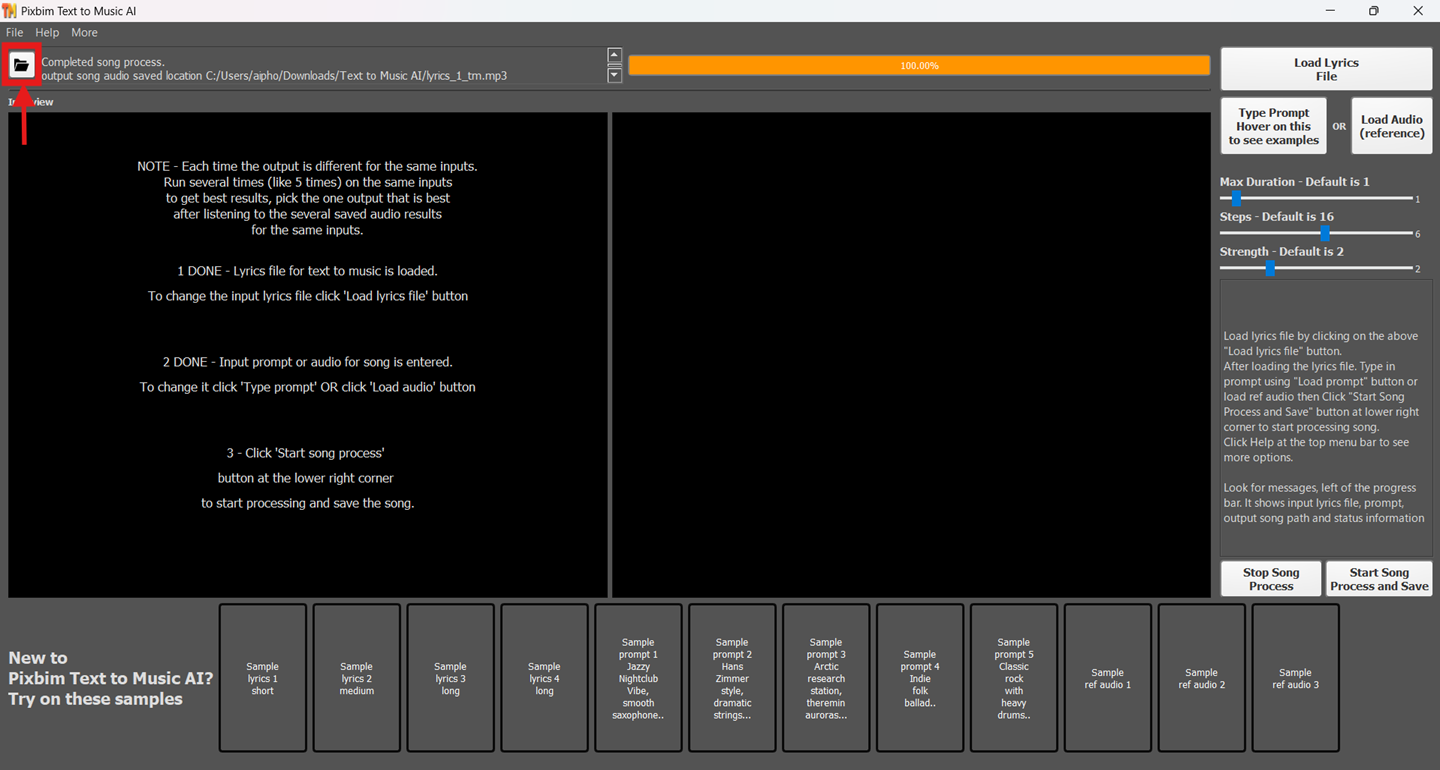
Access the output by clicking the icon that will take you to the folder where your AI-generated song is located. Click the song and feel the vibe of your music.
Frequently Asked Questions (FAQs)
1. Which AI is better for music?
The right AI music tool depends on what you want to create and how much control you want over the result. Pixbim Text to Music AI is designed for turning your lyrics or text ideas into songs, including music with vocals as well as instrumental tracks. It can be a practical choice if you want to create songs from your own ideas without having to produce every part manually.
2. Can I generate a song with AI?
Yes, you can create a complete song with AI by providing lyrics, a music idea (prompt), or a suitable description of the style (prompt) you want. With Pixbim Text to Music AI, you can use your own lyrics and generate music around them, including songs with a singing voice. You can also create instrumental music when you want a track.
Download Free Text to Music AI
Download Free Trial Text to Music AI
3. Which AI music generator is the best?
Many AI music apps have a defined set of music styles and genres, and they lack flexible prompting options. Most music apps also offer only instrumental tags and are not user friendly. A music app should be smart and flexible enough to allow users to experiment with the least amount of input while still giving them the freedom to create their own songs. Pixbim Text to Music AI is the best AI music generator to turn your lyrics and ideas into songs or create instrumental music from text prompts.
4. What is the best AI music maker?
The best AI music maker depends on the kind of music you want to produce. If you want to start with lyrics, prompt and turn that idea into music or song. Pixbim Text to Music AI is the best AI music maker that can provide a straightforward way to do it. Just load your lyrics file, prompt (your requirement). It can create songs with vocals as well as instrumental music, making it useful for different types of music projects.
5. Can AI create an original song?
Yes, AI can generate new combinations of lyrics, melodies, vocals, and instruments to create a song. With Pixbim Text to Music AI, you can start with your own lyrics and turn it into a song.
6. Which AI music generator gives unlimited song generation?
Unlimited generation depends on the product, subscription, and licensing terms offered by each AI music service. If you are looking for a music application that lets you create songs without being restricted by a small number of generations, Pixbim Text to Music AI fits for that type of workflow.
7. Which AI is best for producing music?
The best choice depends on whether you are producing vocals, instrumentals, background music, demos, or complete songs. Pixbim Text to Music AI can be useful when you want to go from a written idea and lyrics to a musical result without building the entire arrangement manually. It supports both vocal songs and instrumental music, so you can use it for different stages of a music project.
8. Can I create music with AI?
Yes, AI music apps can make it possible to create music from your ideas without having to produce every musical element yourself. Pixbim Text to Music AI lets you work from lyrics, text prompts and generate music around those ideas. There is no need to play an instrument or music experience to begin experimenting with AI generated music. You can generate unlimited number of times unlike other music apps that restricts song duration with respect to their paid plans. You can create a song with vocals for a complete musical performance or generate instrumental music for other projects. Just ask AI to make music, and you can create own song that you have always dreamed of.
Free Download Text to Music AI
The current version is 1.0, If you see form submission issues or cannot view the download links after entering email then click "QUICK HELP" in the menu bar at the top of this page and select 'Download Pixbim Text to Music AI', you can access direct download links